You can deposit money into IPL betting apps with UPI, Net banking, E-wallets, and cryptocurrency.
Depositing money on IPL betting apps is easy and takes less than a minute when you use UPI. The money reaches your account before the next ball is bowled.
This guide only covers methods that work on apps you can trust. Whether you are adding money for the first time or trying a new payment method, you will find everything you need to know before IPL season begins.
Top Payment Methods for IPL Betting in India
Here are the top used payment methods for the top IPL betting apps in India:
| Payment Method | Processing Time | Deposit (Approx.) | Success Rate |
|---|---|---|---|
| UPI (PhonePe/GPay) | Instant | ₹300 – ₹1,00,000 | Very High |
| Net Banking (IMPS) | 15 – 45 Mins | ₹500 – ₹2,00,000 | Medium |
| E-Wallets (AstroPay) | Instant | ₹1,000 – ₹1,00,000 | High |
| Cryptocurrency | 10 – 20 Mins | No Limit | High |
Many ways to pay exist on Indian betting apps, but UPI is what most people use. It has no extra charges, works right away, and pulls money straight from your bank.
PhonePe and Google Pay are the two apps most people in India already have on their phones.
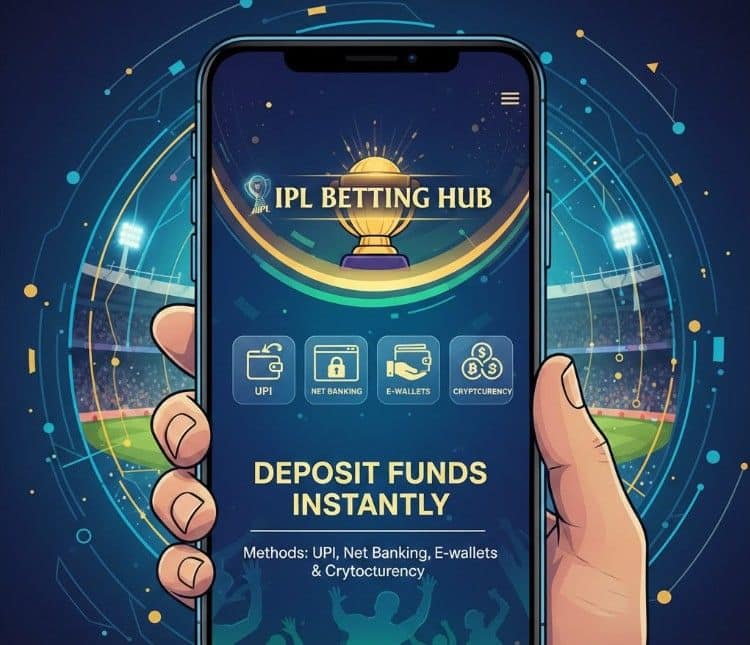
If UPI does not work because your bank has blocked it, try an e-wallet like AstroPay instead. Crypto works for people who want to deposit more than the UPI limit allows.
Net banking works fine, but takes longer, so avoid it when you need the money in your account right away.
How to Deposit Money on IPL Betting Apps? (Step-by-Step)
These steps work on most apps, including 10Cric, Parimatch, and Betway.
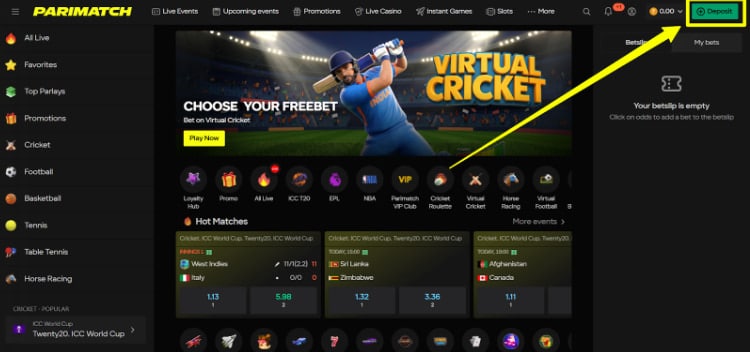
Step 1: Log In and Go to Deposit.
Open the app and tap on your profile or account icon. Look for a button that says ‘Deposit’ or ‘Wallet’ and tap it.
Step 2: Pick Your Payment Method.
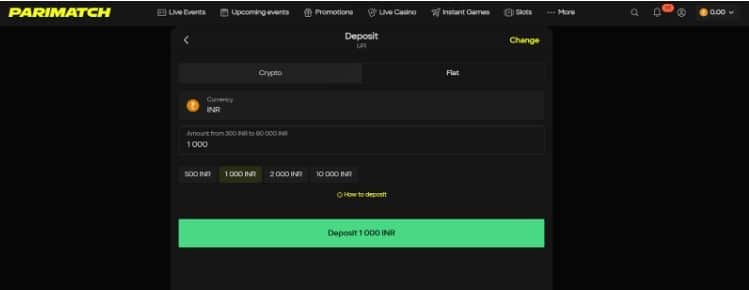
Choose how you want to pay. UPI will usually be the first option on the list, and options will be the same for most apps.

Step 3: Type in the Amount.
Enter how much you want to add. Before you confirm, check if there is a minimum amount needed to get the IPL welcome bonus.
Your UPI app will open on its own, or the betting app will show a QR code. Open PhonePe, Paytm, or Google Pay and approve the payment or scan the code.
A screen will show that the payment worked. Your balance will go up right away.
Maximizing Your IPL First Deposit Bonus
Most betting apps will match your first deposit and add bonus money to your account.
Common Bonus Terms to Watch For
| Bonus Feature | What it Means | Why it Matters |
|---|---|---|
| Wagering Req. | No of times you must use the bonus money before you can take it out. | A high number like 30x makes it hard to withdraw anything. |
| Min. Odds | The lowest odds are allowed when betting with bonus money. | Stops you from betting on results that are almost certain. |
| Expiry Date | The last date to use the bonus. | Usually, 7–30 days during the IPL season. |
Put in ₹5,000, and you get ₹10,000 to play with. But this bonus comes with rules. Reading the rules before you deposit helps you avoid problems later.
Always look at the wagering number first. A 5x number means you use the bonus five times before withdrawing.
A 30x number means thirty times. If that feels like too much work, just skip the bonus and deposit what you need without it.
Safety Tips: Keeping Your Money Secure
Only Use Apps You Can Trust: Deposit money only on apps that have proper licenses and keep your data safe.
Do Not Pay Random People: Never send money to someone on WhatsApp or Telegram who says they run a betting service. Once the money is gone, there is no way to get it back. Always pay through the official app only.
Turn On Two-Step Login: Go to your account settings and turn on two-factor authentication. This means someone needs your phone to log in, even if they know your password.
If you think cricket betting is profitable in 2026, check out the details of legality and taxes before you put your money in.
Troubleshooting: Why Is My Deposit Failing?
Most failed payments happen for one of three reasons.
- Your Bank Has Blocked It
Some Indian banks do not allow money to go directly to betting sites. Use AstroPay or another e-wallet to get around this without changing your bank.
- You Hit the UPI Limit
The standard UPI limit is ₹1 lakh per day, but many betting platforms and individual banks may have lower transaction limits (often ₹25,000 to ₹50,000 per transaction) for security. If you have already sent that much today, wait until midnight when the limit resets, or use net banking for a larger amount.
- Names Do Not Match
The name on your bank account must be the same as the name on your betting account. Even one letter being different can stop the payment. Ask support to fix it and then try again.
Suggested Reads:
Conclusion: Deposit Money In IPL Betting Apps With UPI, Net Banking And Cryptocurrency
Adding money to your IPL betting account does not have to be hard. Open the app, go to the deposit page, pick UPI, type in the amount, and approve it from your phone.
The money shows up in seconds. Use only apps that are licensed, and never pay outside of the official platform.
Set a limit on how much you want to spend, stick to it, and keep the focus on enjoying IPL this season.
FAQs
Go to the Deposit section in your account, pick UPI or another method, type in the amount, and approve it from your bank app. The money shows up right away.
Use verified and licensed apps like 10Cric and Parimatch. Never send money to a person or any platform that is not an official app.
The rules are different in each state. Some states allow it, and some do not. Check what the law says in your state before you sign up.
Log in, go to the Deposit or Wallet section, pick a payment method, enter the amount, and confirm from your UPI app. It takes less than a minute.
Open Sportsbet, go to your account, tap Deposit, pick a payment method, and enter the amount. UPI and e-wallets are the two options that work for users in India.